True Analog Output with a DAC
The R4 Minima includes a digital-to-analog converter. This is useful for waveform and audio experiments because you can generate a real analog output instead of relying only on PWM.
Arduino Buying Guide
The Uno R3 is the classic choice with years of tutorials and library support. The Uno R4 Minima keeps the familiar Uno shape while adding USB-C and useful modern features. This guide focuses on the differences you will actually notice when using the boards.
As an Amazon Associate I earn from qualifying purchases. This article contains affiliate links.
Quick Answer
If you are buying an Arduino Uno today and do not specifically need the older AVR platform, I would choose the Uno R4 Minima. You get USB-C, a faster 32-bit processor, and useful built-in features such as a DAC, real-time clock, CAN support, and USB keyboard/mouse emulation.
The Uno R3 is still a good choice when you are following an older tutorial exactly, using an AVR-specific library, or want the huge amount of existing R3 documentation and examples.
You do not need a long memory-specification table to understand the main difference. The important question is what changes when you actually connect, program, and build projects with each board.
| What You Notice | Uno R3 | Uno R4 Minima |
|---|---|---|
| USB cable | USB Type-B | USB-C |
| Processor platform | Classic 8-bit AVR | Modern 32-bit Arm-based Renesas |
| Older tutorials | Excellent match | Basic projects often translate, but not every old library does |
| AVR-specific libraries | Best compatibility | May need an R4-compatible version or code changes |
| Analog audio output | No built-in DAC | Built-in DAC |
| Real-time clock | No built-in RTC | Built-in RTC |
| USB keyboard / mouse projects | Not a standard Uno R3 feature | HID support |
| CAN projects | No built-in CAN controller | CAN support; external transceiver required |
| Best reason to buy | Legacy compatibility | Modern everyday choice with more room to grow |
This article compares the classic Arduino Uno R3 with the Arduino Uno R4 Minima. The Uno R4 WiFi is a different R4 model that also adds Wi-Fi, Bluetooth, and an LED matrix.
This is one of the first differences you notice in daily use. A classic Uno R3 uses the large square USB Type-B connector. The Uno R4 Minima uses USB-C.
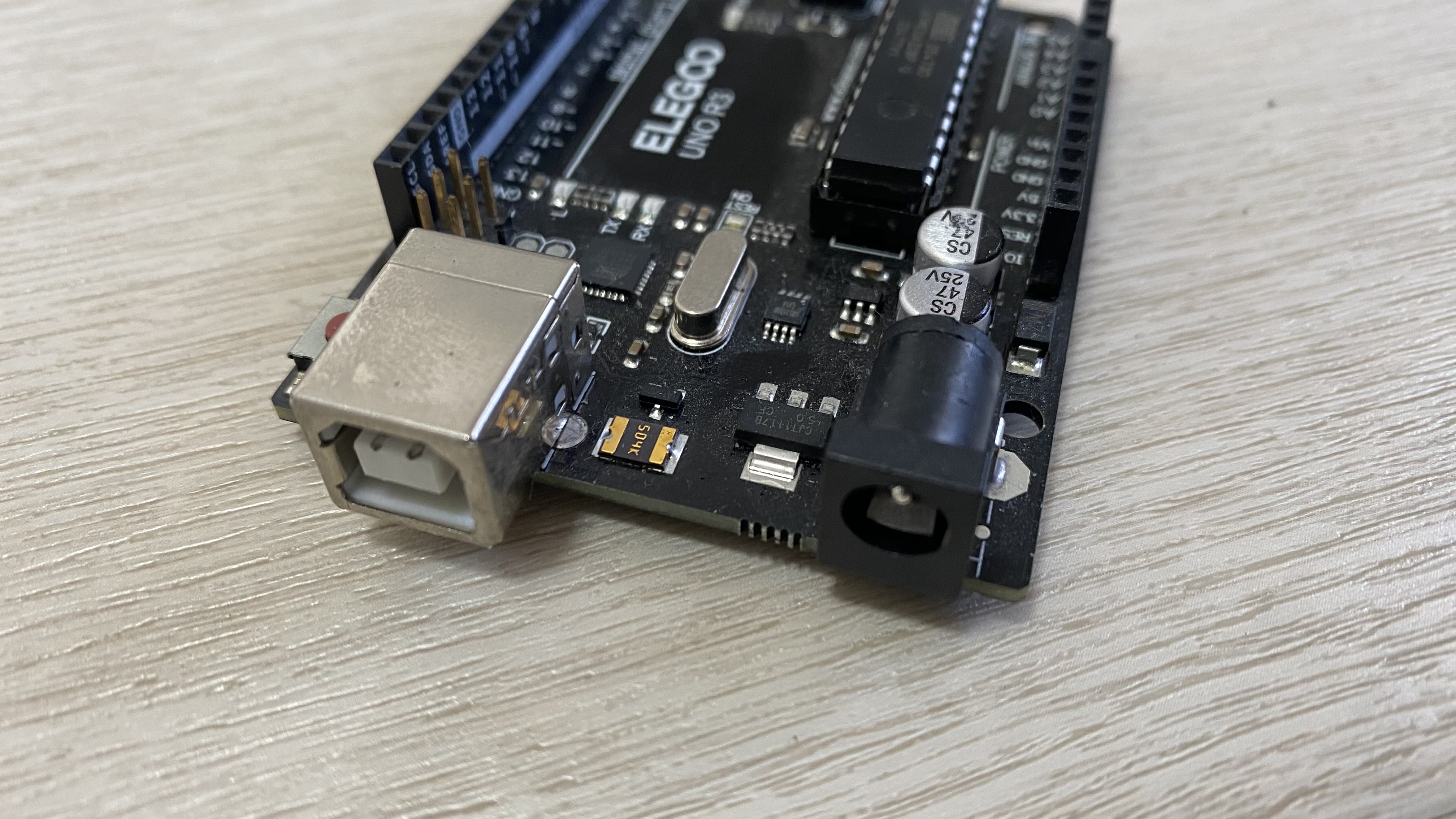
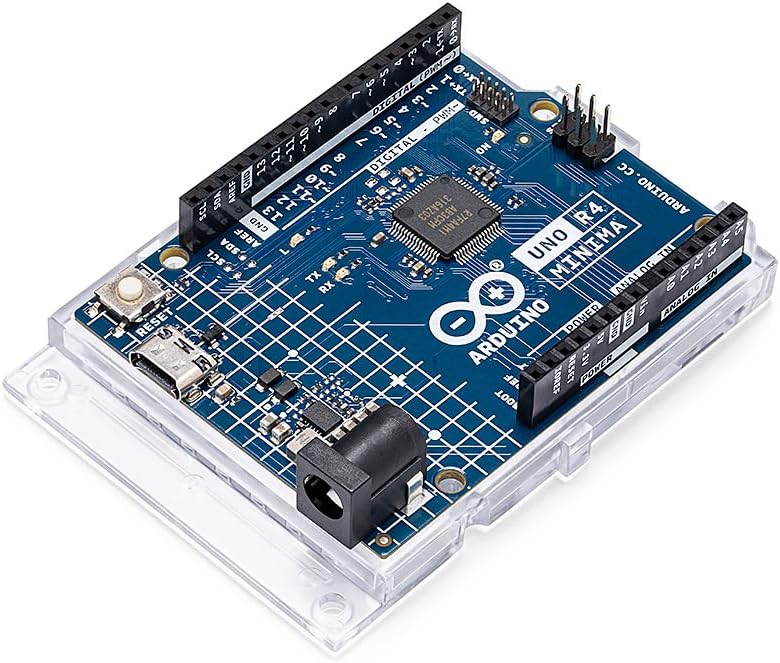
The Uno R3 is the traditional Arduino Uno. It uses the ATmega328P platform and appears in an enormous number of beginner tutorials, classroom projects, kits, books, and hobby projects.
For beginner work such as LEDs, buttons, buzzers, simple sensors, motors, and breadboard circuits, the R3 remains easy to understand and easy to find examples for.
The Uno R4 Minima keeps the familiar Uno form factor and 5 V operating voltage, but changes the processor platform to a modern 32-bit Renesas RA4M1. In everyday use it still feels like an Uno: connect the board, select it in Arduino IDE, upload a sketch, and wire components to the familiar headers.
The difference becomes more useful as your projects become more advanced. The R4 gives you hardware features that would normally require extra components or a different board.
For a new buyer, the R4 Minima gives you the familiar Uno layout while leaving more options open for future projects. You can start with a simple LED or buzzer and later experiment with analog output, timekeeping, CAN, or USB HID without immediately changing boards.
Check Uno R4 on AmazonThese are the R4 features that can actually change the kinds of projects you build.
The R4 Minima includes a digital-to-analog converter. This is useful for waveform and audio experiments because you can generate a real analog output instead of relying only on PWM.
The onboard RTC can track time and date and can be used for alarms or scheduled behavior. On an R3 project, accurate timekeeping commonly means adding an external RTC module.
The R4 supports USB HID, so projects can emulate devices such as a keyboard or mouse. That opens up controller, macro-pad, and custom input-device projects.
The R4 includes CAN capability. You still need an external CAN transceiver, but the board gives you a starting point for automotive and industrial communication projects.
The R4 can read analog signals at higher resolution than the classic R3, which can be useful when your project needs finer sensor measurements.
The R4 Minima supports a wider external input-voltage range than the classic R3, which can make some standalone projects easier to power.
Basic Arduino sketches that use standard functions such as digitalWrite(),
digitalRead(), and analogRead() are often straightforward to move.
The main compatibility issue appears when code or a library depends on the AVR architecture used by the R3.
The R4 uses a different processor architecture, so code that directly manipulates AVR registers, depends on ATmega328P-specific timing, or uses a library that only supports AVR may need modification.
You have a specific tutorial, shield library, or AVR project that you do not want to modify.
You are not tied to AVR-specific code and want the newer board and its additional capabilities.
My Pick
The R3's biggest advantage is compatibility with the enormous ecosystem of older AVR-focused tutorials and libraries. That is a real reason to buy it, especially when you already know the exact project you want to reproduce.
For someone starting from zero, however, I think the R4 Minima is the more useful long-term purchase. USB-C is more convenient, the board remains familiar for basic Arduino projects, and its extra hardware features give you more directions to explore after the beginner stage.
The practical differences in this article were checked against Arduino's official documentation for the Uno R3 and Uno R4 Minima.